
DEFINISI
User Defined Function (UDF) adalah sebuah database application object yang memungkinkan user untuk meng-extend SQL language dengan konsep mereka sendiri. UDF adalah function yang akan me-return sebuah atau beberapa nilai yang merupakan hasil dari business logic, dimana fungsi tersebut terlibat pada proses bisnis. UDF dapat di-develop dengan beberapa bahasa termasuk SQL, PL, Java, C/C++, OLE, CLR.
Berikut contoh sederhana yang menunjukkan bagaimana meng-create dan memanggil user defined function dari DB2 command window atau linux shell
db2 create function F1() returns integer begin return 1000; end
db2 values F1
pada contoh di atas, fungsi F1 akan me-retturn nilai 100, dan values statement dapat digunakan untuk memanggil function yang kita buat. Sama seperti yang dijelaskan pada materi stored procedure, untuk proses pembuatan user defined function lebih mudah menggunakan IBM data studio.
Tipe Function
1. Scalar function
Fungsi ini hanya me-return single value, serta tidak dapat mengubah kondisi state dari database ( tidak dapat menggunakan insert, update, delete dalam function)
contoh penerapan scalar function
CREATE FUNCTION deptname(p_empid VARCHAR(6))
RETURNS VARCHAR(30)
SPECIFIC deptname
BEGIN ATOMIC
DECLARE v_department_name VARCHAR(30);
DECLARE v_err VARCHAR(70);
SET v_department_name = (
SELECT d.deptname FROM department d, employee e
WHERE e.workdept=d.deptno AND e.empno= p_empid);
SET v_err = ‘Error: employee ‘ || p_empid || ‘ was not found’;
IF v_department_name IS NULL THEN
SIGNAL SQLSTATE ‘80000’ SET MESSAGE_TEXT=v_err;
END IF;
RETURN v_department_name;
END
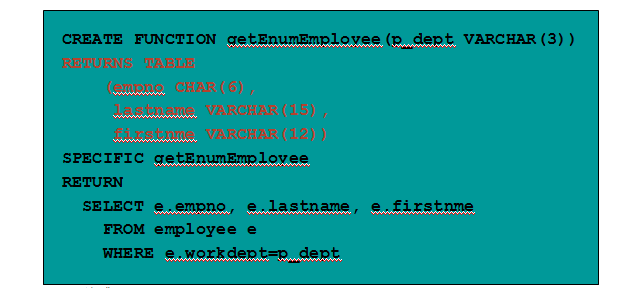
2. Table function
– Mengembalikkan nilai dalam format tabel
– dapat mengubah state dari database (memungkinkan menggunakan insert, update, delete) dalam function
contoh: MQREADALL(), SNAPSHOT_DYN_SQL()
contoh penerapan table function :
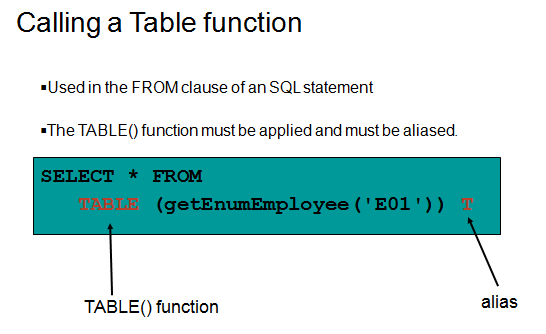
contoh pemanggilan table function :
Tipe lain dari function adalah row function dan column function, pada tutorial kali ini dua function tersebut tidak akan dibahas.
LANGKAH PEMBUATAN FUNCTION PADA IBM data studio
Procedure to create, deploy, and run a user-defined function (UDF)
1. Creating user-defined functions (UDFs), is very similar to creating Stored Procedures. You can create a UDF by issuing the CREATE FUNCTION statement from the DB2 Command Window or the DB2 Command Editor. For ease of development, we recommend you to use IBM Data Studio.
2. To develop a UDF from IBM Data Studio, let’s use the same project we used when working with Stored Procedures. Right-click the User-Defined Functions folder, and click New -> User-Defined Function menu item.
3. Give the name myfunction to your function, and click on Next.
4. In the SQL Statement or Expression window, IBM Data Studio will provide an SQL statement as example. Change this statement to:
SELECT count(*) FROM EMPLOYEE
At this point click on finish. A template as shown in the figure below should be displayed:
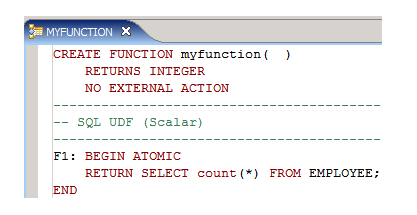
5. Let’s now deploy the function and run it. From the Data Project Explorer panel, right-click on the function myfunction, and choose Deploy. On the Deploy options window, leave all defaults as they are, and click on Finish.
6. After a successful deployment, right-click again on the function, and choose Run. At the bottom right corner you will see the result.
7. To run the function from the DB2 Command Editor issue the following:
connect to sample;
values myfunction();
8. Instead of using the values clause, you can also issue a SELECT statement as shown below:
select myfunction() from sysibm.sysdummy1;
SYSIBM.SYSDUMMY1 is a table provided with DB2 that contains one row and one column. It can be used for this purpose where you are calling a function from a SELECT statement, but you don’t really need to access any table. Because the SELECT statement requires a table as part of its syntax, we need to provide a table. Of course, you can create your own “dummy” table for this same purpose.
 db2tutorial20112012